Question about results.html() wraps text in a span

Hi all,

Happy new Year 2026!.

I have a question about the results.html() wraps text in a span

<span class="ol_wrapped dynamic" data-matched="@My Content Here@">
<p>Hello World!</p>
</span>

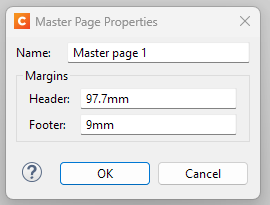
I have an issue where if the text/content is larger in height than the page size of my document, it does not flow to the next page. I have spplied these settings on my master page 1

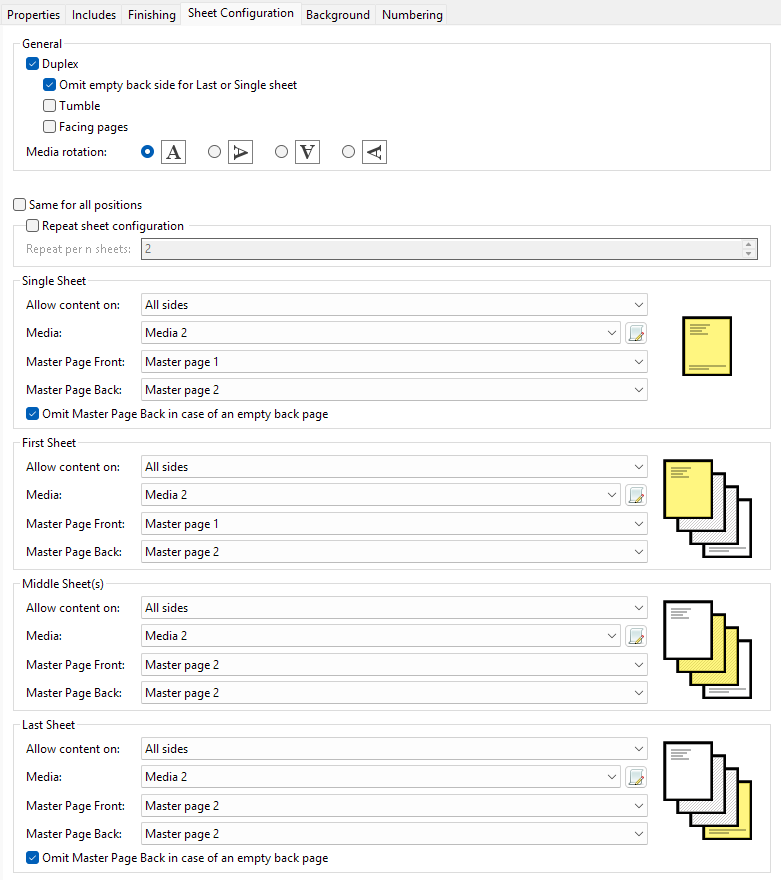
And my sheet configuration as the below

The @My Content Here@ is populated with html contents with lots of paragraphs and ables.

Is there a way to remove this span and still render the html content as html? I think this span is the culprit.

Thank you in advance.

James.

The result of a text search gets wrapped in a span if it is not a discrete element. In your case the @My Content Here@ text is probably followed by other content.

I think things will work better if you use replaceWith() instead of html(). That way the span gets replaced with the Hello World paragraph.

(And Happy New Year to you too!)

Hi @Sander,

That seems to work, thank you.

I also noticed that when I use a paragraph tag with a class, an additional “dynamic” class is automatically added to the paragraph.

<p class="my-content-here dynamic"></p>

It still works as expected, and the settings defined on the master page cause the content to break correctly.

Is this the expected behaviour? When using only a text placeholder (for example, @My Content Here@), is the content wrapped in a span element instead?

Yes, in some scenarios the current version of Connect adds the “dynamic” class to scripted content. This is meant to trigger an internal style rule with user-modify:read-only, ensuring that scripted content is read-only in preview mode. This is just cosmetic, it should not affect output.

Adding that class is actually legacy behavior. We are no longer adding it in the upcoming CEF-based version of Connect.
1 Like