Im just started using the REST api via JS and want to pass runtime parameters to datamapper service where the datamapper field will apply the value from the runtime parameter.
… var params = {
“parameters”: {
“extraData”: “Hello world”
}
}
var url = “/rest/serverengine/workflow/datamining/”+mapperID+“/”+dataID +“?validate=”+(isValidate?true:false)
var xhttp = new ActiveXObject(“Microsoft.XMLHTTP”);
xhttp.open(“POST”, url, false);
xhttp.setRequestHeader(‘Content-Type’, ‘application/json’);
xhttp.send(JSON.stringify(params));
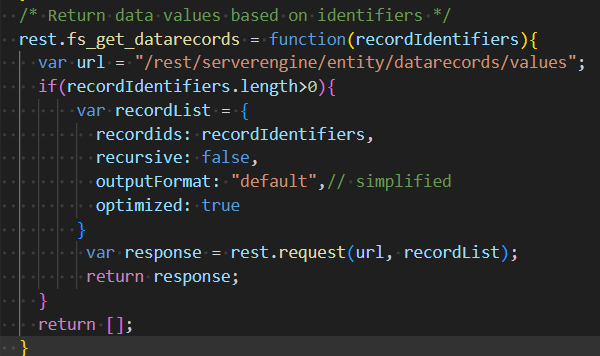
The datamapper runs per normal but when I get the values using this endpoint
/rest/serverengine/entity/datarecords/values
The parameter is not getting applied to the job number field is instead pulling the default value.
Please try it but with your own defined runtime parameter. ExtraData has a special meaning in OL Connect and I am not sure what will happen when you use it like automation.parameters.extraData for a field.
I have tried this and didn’t work. I added “range”, the range param actually works and it retrieves number of records based on value. The mapper also have set runtime params to have var1, and still no go.
Is it possible json structure is different for the datamapper?
Thanks
Note: The “extraData” as runtime parameter in workflow actually works when using the plugin. Since the Connect plugins are just a bunch of script to call the REST api endpoints, I imagine it shouldnt be an issue in my understanding.
I guess the other EP is bugged. Since the documentation should allow for the optional parameters.
Another question, it seems like I get a 500 error if I dont provide the runtime parameter? Is this normal behaviour? I was hoping if the runtime parameter isnt provided, the debug/default value get use instead.
What does the JSON data look like when this happens?
Update — I am able to reproduce something similar. The reason why this is happening is because the source of a runtime parameter value must be set in the automation tool, e.g. OL Connect Workflow, the moment the runtime parameter is defined on the datamapper side via the Parameters pane.
A possible solution would most likely be to apply a script like the below one on the datamapper side to allocate a (default) value to the record field “jobNo”:
var jobNo = ""; // Default value

if ("jobNo" in automation.parameters) {
	jobNo = automation.parameters.jobNo;
}

jobNo;

 Thank you