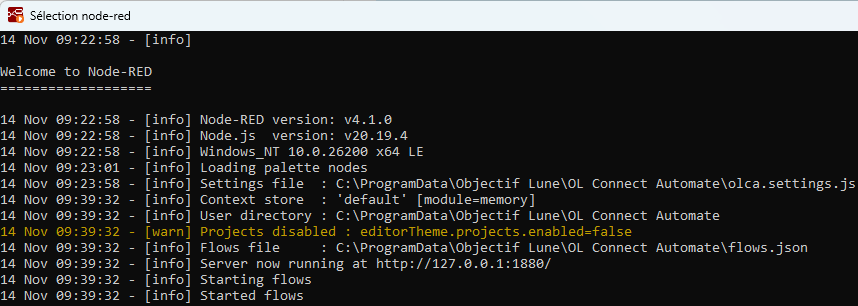
Frequently, when I start OLC Automate from the desktop icon “Start OL Connect Automate”, it brings up that little console, gets to “Loading palette nodes” and then… sits there. It’s not until I press CTRL+C that it then finishes starting up correctly. See the screenshot below. I had to press CTRL+C at 9:39:32 to get it to finish. Any idea why this would happen? I’m running on a Windows 11 machine and using OLC Automate version 0.9.19.2751, if that helps.
Does the Stop OL Connect Automate service shortcut also exists next to the Start OL Connect Automate service one? The reason why I am asking is because I had a similar issue too when only one of these two shortcuts was installed.
No, I don’t have a “Stop OL Connect Automate service” icon, I only have one for Start.
Noticed that only the Start OL Connect Automate service shortcut is added to (Windows) Desktop when the option Start Node-RED at system startup is kept unchecked on the Node-RED Setup page of the OL Coonect Automate Setup. Both shortcuts are added to Desktop when this option is checked.
[internal reference: NODERED-3310]
In the meantime, I myself go via the Task Manager->Services and use Start, Stop and Restart from the Node-RED service
I understand that this behaviour is intentional. The reason why there are two shortcuts in service mode is to simplify the user experience and not force them to go in the service console to stop the OL Connect Automate service.