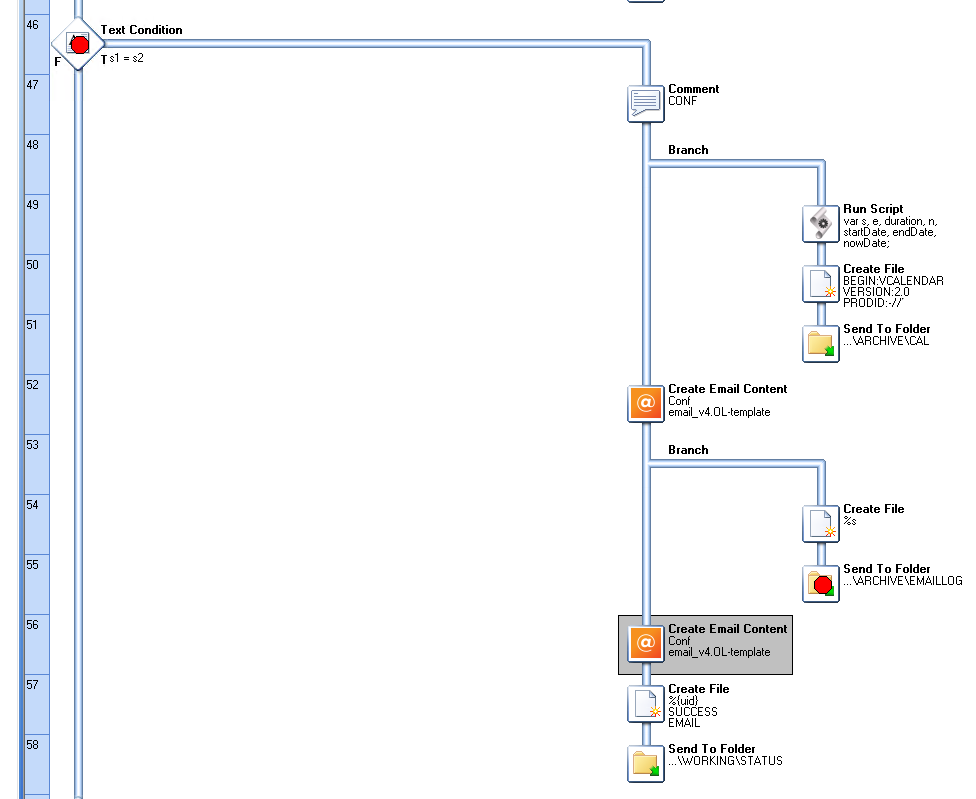
We use a script to deploy new versions of OL Connect templates and workflow definition file. This process follows a standard process of (1) Stop Workflow service, waiting for the service to stop, (2) Copy in the new template files into Documents\In folder, (3) Start Workflow service.
During this process we expect that all jobs that had already started, would run to completion during step 1.
We’ve found however, that the OL Connect SMTP Service can stop on the local machine, before the in-flight jobs have completed.
What strategies would be recommended to avoid this timing conflict?
Specifically, it appears to be the Create Email Content task that fails, as the SMTP on 127.0.0.1 is stopped.
In all of the Workflow processes that are problematic (the ones sending emails), you could set a global variable (e.g. emailInProgress=1) at the start of the process and reset it at the end.
Your other process that stops/resumes the Workflow service could first check the status of the emailInProgress variable (which would tell it whether or not an emailing operation is currently being performed). Depending on the status of that variable, it would either stop the services or just postpone the operation until the variable has been reset at the end of the other processes.
To make the entire operation even more robust, you could also have your stop/resume process set a variable of its own (restartRequested=1). Your emailing processes could first check the status of that variable before performing the rest of the emailing operation. This would ensure that a second emailing operation isn’t launched in between the time the start/resume process is called and the previous emailing process finishes.
@Phil, isn’t the nomral way of Workflow to call all proceeses to tell them, in layman term, finish what you are doing and then stop?
Why would the Connect Create Email Content behave differently? I know the Connect Server works indenpendantly of the Workflow but the proces itself should wait for the step of Create Email Content, then the rest of the steps and then stop…no?
The Create Email Content only is async when it is set as the last step of a branch…no?
@jchamel : I believe the Email Content Creation is handled by the Connect-related services, whereas the Workflow service, when being stopped and restarted, will only take care of its own dependent services.
You’d have to confirm that with R&D, just to be safe, but I do believe that’s the issue here.
I have asked the question and will post my findings here…patience…
In the mean time I am incline to think that the Workflow process would wait for the Connect plugin, unless that plugin is the last step of a branch.
I recently had an issue where the Create Email Content plugin would take very long and the whole process was waiting for it but it wasn’t in a case of restarting the Workflow services.
When Workflow Service is stopped and restarted from a script to a call to the Workflow services, does it still operate as if it was stopped and restarted from the Workflow Configuration tool or the Workflow console I.E. Does it call all processes to tell them to finish what they are doing and then stop?
If so, if a Connect jobs is running and it was sent by any Connect Create Content, and that plugin wasn’t the last step of a branch (making it sync in the process), will the process wait for that plugin to receive a confirmation that the job is finished by the Connect Server and engines?
Here’s the R&D answer (roughly translated from French ):
It is not exaclty the same when you stop the Workflow services via a script than from the Workflow Configuration tool or the Worflow Service Console. When you send a stop signal (one way or another) to the service, it terminate its execution. If steps weren’t finished, it will run them and the service will be in a wait state until done. The Workflow Service Console handles that by giving you a little loop which show you it is stopping.
If you stop the Workflow service via a script, it will be in wait state like from the Console or configuration but if you don’t handle the status, you won’t know if the service has stopped. You need to check the service status to see if it is “stopped pending” or “stopped”.
It is important to note that if you use taskkill, or an equivalent, it won’t wait and will kill the service, as the Console does by the “kill service” option.
Now your question doesn’t cover other important facts:
- If incoming data are queued to be processed by Workflow, they will not impact the stopping and will be handled once Workflow has been restarted.
- Replicated process will each be handled as their own process and will impact the final ending.
- When a process finishes, it normally check the input to see if nothing else is waiting. If not, then stops. In case of stopping Workflow it won’t check. (yes this related to the first important fact but just in case )
As for the requested answer from this whole thing:
Unless the Connect plugin is that last one of a branch, it is sync to the process hence the process will wait for completion confirmation from the Connect Server/Engines.
Small exception, the Create Output plugin will be handled based on the Output Management choice:
-As defined by Output Preset: won’t wait
-Through Workflow: will wait
Hope that clarify your situation. Feel free to open a technical support ticket through our website, should you need more help or think somethng is wrong.