We’re excited to introduce the latest updates for OL Connect Automate, which includes some interesting new modules and enhancements. Here’s what’s new in version 0.9.19:
New 
-
OL Remote Print nodes: A new package enabling full control of OLRP print jobs. These nodes allow you to download jobs, retrieve job information, update statuses, and delete jobs, making it easier to build automated remote printing workflows with OL Connect Automate.
Package name: @objectif-lune/node-red-contrib-ol-remote-print -
Therefore nodes: To expand support for document management systems, a dedicated package for Therefore™ integration has been added. These nodes enable seamless connectivity with Therefore™, making it easier to incorporate document management capabilities directly into your flows.
Package name: @objectif-lune/node-red-contrib-therefore -
New examples: A set of sample flows has been added to illustrate common concepts and help you jumpstart your projects. You can access these examples from the Import → Examples section in Node-RED.
- OLRP Check Job Status: Learn how to setup an OL Remote Print project with interaction and redirection web pages.
- COTG Timesheets: Demonstrates how to set up a complete COTG project, from creating personalized HTML forms to serving them to the app and capturing submitted data.
- OLC Document Mapping - Split a PDF document: Learn how to split print-ready files using OL Connect standard techniques with a data mapping configuration, a job preset and an output preset.
-
Environment Variables: The OL Connect Automate installer now supports defining environment variables, stored in the
olca.environments.jsonfile within the Program Data folder. These variables are automatically available to flows but remain external to them. Typical uses include system-specific settings such as Workspace folder paths, API keys, database credentials, and other environment-dependent parameters. Keeping values separate from flow files helps prevent accidental exposure in version control (e.g., Git) and makes it easier to manage configurations across environments (development, testing, production).
The example below shows how the ENV_WORKSPACE variable can be referenced in a JSONata expression to build a path to a job folder under the location defined by the environment variable:$env("ENV_WORKSPACE") & "\\olrp\\mail-merge\\jobs\\" & jobId & "\\jobdata.pdf"
This constructs the full file path dynamically, combining the workspace location with the job ID and target file name.
Note: The olca.environments.json file is available only for OL Connect Automate instances installed with the OLCA Installer version 0.9.19 or later. Additional environment variable entries can be added manually using a text editor, provided the file remains valid JSON.
Improvements 
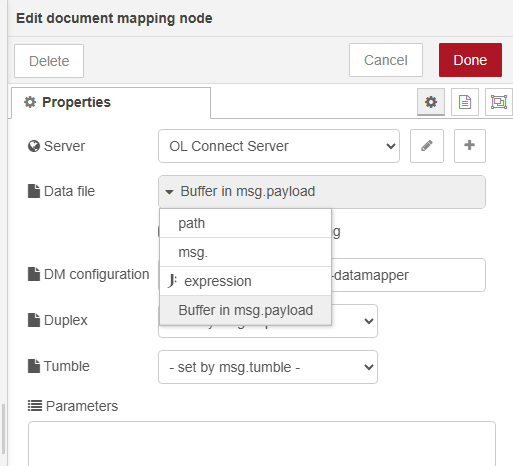
- Data Mapping and Document Mapping nodes: These nodes now support uploading in-memory file data (
Bufferinmsg.payload) directly to OL Connect’s File Store as the data file. This removes the need for a separate File Store upload step before using a Data Mapping or Document Mapping node, which is especially useful when processing PostScript files retrieved from the OL Remote Print Server.
Updating and installing nodes
To update or install nodes, simply access the Palette Manager within the Node-RED editor. From there, you can check for updates and apply them accordingly. This interface also facilitates the installation of new nodes.
For new comers to OL Connect Automate, utilize the Windows installer available in the Downloads section of the OL Resource Center.
This installer streamlines the process by automatically installing necessary components and the latest collection of OL Connect Automate nodes.
A word of caution
The packages are part of the OL Connect Automate stack. It is intended for use by current users of OL Connect who want to experiment with automating server operations through Node-RED. The OL Connect Automate stack is a technology preview.
Support
At this early stage, the OL Connect Automate stack is not supported through the OL Care program. Feel free to visit this forum to post questions, comments and suggestions.