I’m just wondering if anyone has put a large number of flows into automate yet. We have 200+ currently in workflow and causes us no end of issues with out of memory etc. So wondered if anyone had tested automate with this many yet as it’s working for me fine with a handful but keen to understand if it will handle a large amount like this
To add to @jchamel’s reply, the issue you’re describing is the precise reason why Automate was developed in the first place (along with full Unicode support, of course!).
It is difficult to determine with any accuracy how many parallel flows you could implement with Automate (I’ve used tens of them without a hitch, but admittedly not hundreds). But the very architecture of Automate grants it more power and resilience than Workflow could ever have. And this statement comes from a member of the original team that developed Workflow (that would be me!).
That said, if your flows are heavily dependent on external resources (databases, remote REST calls, shared drives), then Automate will be subject to the same types of limitations Workflow is, but that’s a matter of performance, not memory.
Sorry but I don’t understand how that answers my question? That’s about how the flows flow as such. My question is regarding when you deploy and what happens
Thanks for this, but what if something is currently running through the node? As like workflow there’s no way of knowing whats currently running it could be that there is a large job running through a mapper which might take 1hr plus to run, So if you push a new node through the one that’s currently running what would happen?
Whatever you do in Node-RED, once it has requested some action from the Connect Server, the Connect Server will just continue doing it’s job. So worst case here is that you have a created a dataset, but it isn’t picked up for further processing.
I just tested this with a simple scenario:
running a flow with the standard datamapper-content-job-output nodes
processing a 1000 records so I have time to deploy while the process is active
moving the active nodes around in the editor to make them ‘changed’ and then deploy, while the process is active
Result:
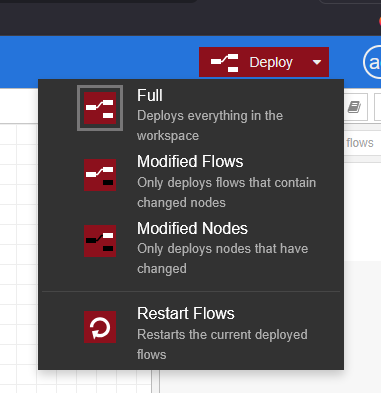
When I deploy ‘Modified Flows’, there’s no problem. Progress keeps showing under the active node, and the resulting output msg gets picked up by the next node. This goes for all four of these nodes.
When I deploy ‘Full’, it will not proceed.
Some common sense is needed here. If you delete nodes, or change them in ways that the message flow can’t proceed in the same way, you can’t expect this to work even if you only deploy modified nodes or flows. For example if you change the node that is currently active in some other way than only changing its position.
You could also have more complex systems where you only do data mapping or content creation, leave the data sets or content sets on the server, and at later time time pick them up in a separate process. If you make changes to the flows before the later pick up, that wouldn’t be a problem, as the data sets and content sets are waiting on the Connect Server.
In general, I wouldn’t recommend editing and deploying the flows while you are in the middle of production! Don’t shoot in your own foot… On the other hand, specifically the Debug node can be toggled on and off without having to deploy at all, to control what debug info shows up in the debug panel.
Thanks for this it does help, however we will have 250+ active flows once we migrate everything over and jobs are running 24/7 so we can’t just say we won’t deploy while anything is in production as we don’t have anytime things are processing. We would of course be wouldn’t working on nodes in the prouction system. We will have a test system where users make changes and test etc. We will only be deploying once testing has done.
The way I see this working is:
User makes changes in test system
Exports flow to file
Imports to live system and deploys
So as there is no way of seeing what’s running how would we know when we could deploy just the node that we need to without messing up the job that is running.