Xml contains a field, after which there are sections in the template that process the specified , but since data that is incorrectly filled in has started to arrive, I would like to somehow validate this field and then further in the workflow determine whether to continue or stop the process due to incorrect data. The idea is that there are permissible filling options, for example: “text1”, “text2”, “text3”, if the xml contains only these then there is some variable that will have the value OK in this case, but if there is at least one record in the entire xml file that is different or empty, then the variable will be, for example, NO. And then you can look at this variable and continue or stop further processing. I would be grateful for the implementation implications.
Hummm…I think this could be achievable through XLST. Unfortunately, my knowledge of it is very poor.
Pinging @Phil …he is very good at it..if it can be used…of course!
You could setup a Connect Datamapper to validate the data. One that wouldn’t extract data but simply validate the content and throw an error if something is amiss.
In that Datamapper, build you validation logic and when you wish to trigger an error, add and Action an it that script type:
throw new Error("<the error>")
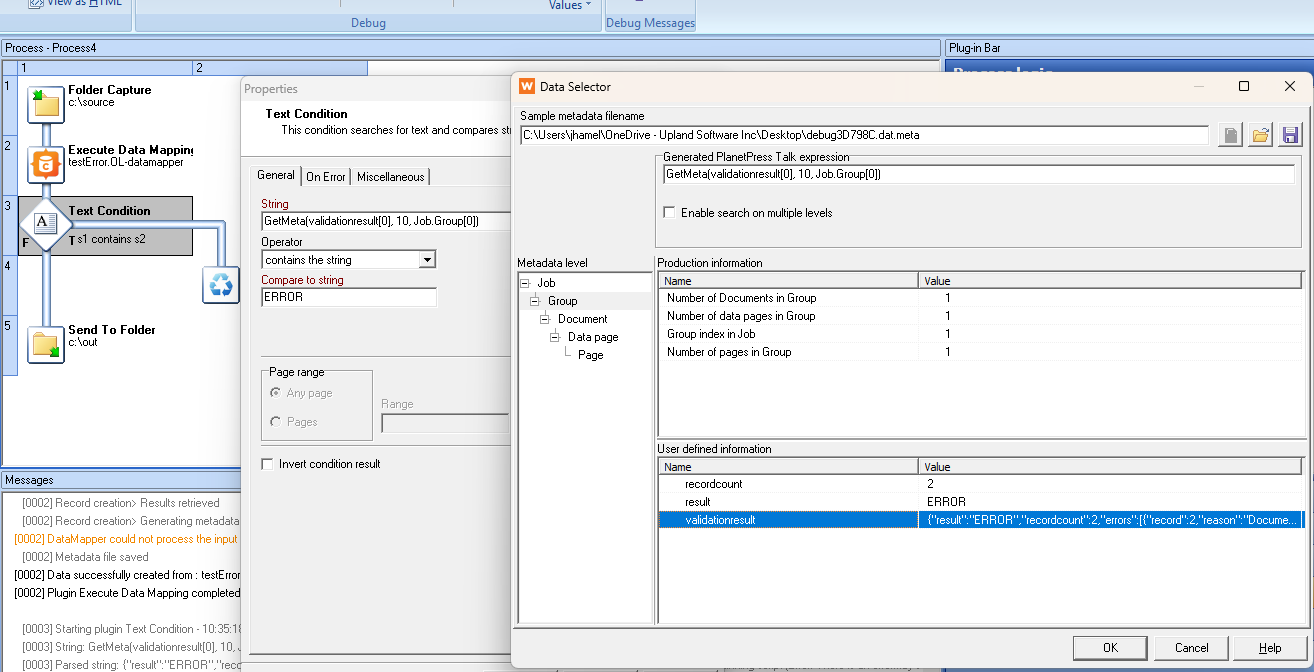
In your Workflow, in the Execute datamapping plugin, in the Output Type drop-down, select None (validate only)
Then setup a Text Condition that look at the validationresult at the Job.Group level and compare the result found with either ERROR of some specific keyword that you can add in your error handling in the Datamapper. This would allow you to act differently on the error produce.
Thank you for the idea, it seems very acceptable and workable. Thank you.
I think that is the most sensible approach. The DataMapper would use a condition to validate 2 things:
- does the field exist in all records
- does it contain a valid value
If any of these checks fail for any of the records, then the entire job is invalid.
Running the DM Config in validate only mode provides a quick way of running through all records.
Attached is a sample DM config that checks for the presence of the field myField in all records. Record 4 fails (and therefore, the entire job fails) because the field even though the field is present, it contains an invalid value (text4) when only text1, text2 or text3 are allowed.
ValidateField.OL-datamapper (3.5 KB)
Thank you for your ideas, you helped me very quickly with your suggestions. All I have to do now is adopt them for a specific task and protect the process from incorrect data from the client. Thank you very much.