Hi,
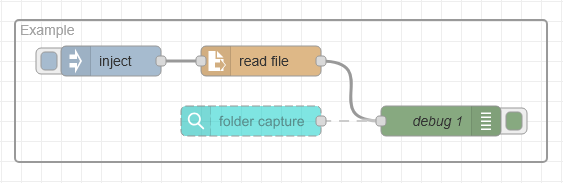
Every time I start OLCA my test flow picks up old data and produces new output. Why? I can’t have the flow delete the data. I need the equivalent of Workflows archive attribute to keep input data.
Am I missing something?
Regards,
S
Hi,
Every time I start OLCA my test flow picks up old data and produces new output. Why? I can’t have the flow delete the data. I need the equivalent of Workflows archive attribute to keep input data.
Am I missing something?
Regards,
S
How about moving the file to a different folder? Can you provide some context on the use case?
Disabling the folder capture node and using the inject and read file nodes instead when you are testing a flow could be an option.
Hi Erik,
I was under the impression that Workflows functionality would come to OLCA. (or at least most of them) I just wanted to know if I might have missed an Archive Attribute option. Copying the file to another location is a viable option but adds extra logic/nodes to the flow.
I have had very little time to get into OLCA (developing a mobile app has taken my attention), so I am just trying to convert a simple statement run from Workflow, copying each of Workflows plugins settings/logic as I go.
@Marten, this “test flow” will become a live flow for us.
I have another gripe regarding Node-RED in general but don’t want to derail this threads topic.
Regards,
S
Hi Sharne,
By design, OL Connect Automate leaves files in their original location after processing. Any cleanup, archiving, moving, or deletion typically needs to be handled explicitly within the flow.
I would like to better understand your use case. Could you elaborate on why the source data cannot be deleted or moved as part of your flow logic after it has been processed?
Your input will help us determine whether we should consider enhancements in this area, or whether there are best-practice patterns we can recommend to address your scenario.
Erik
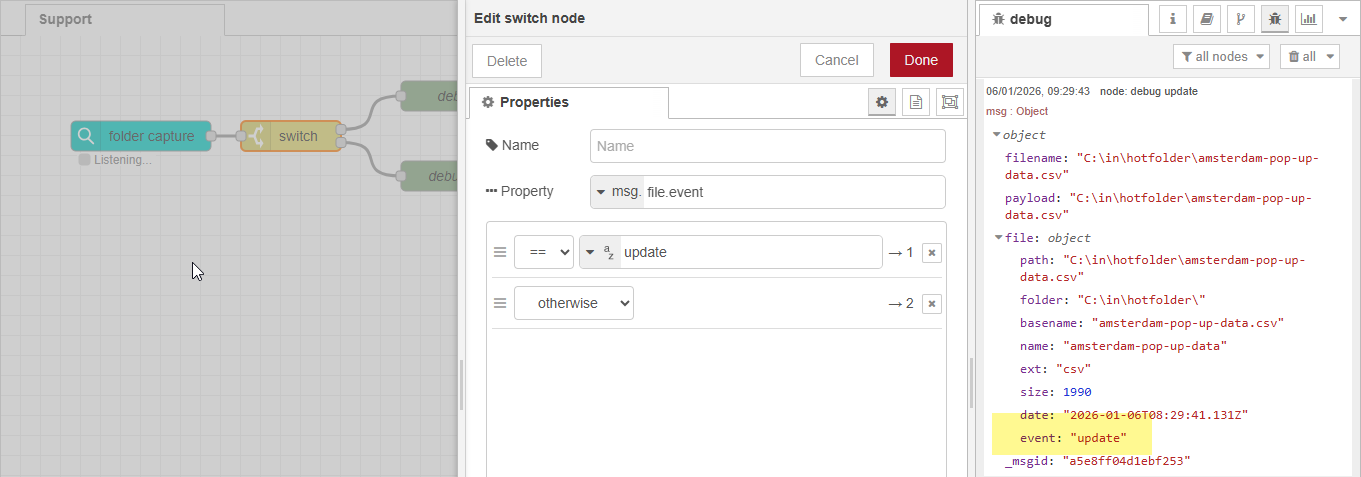
I have had a few conversations on this topic, and I assume you may want to monitor the folder specifically for file update or edit events. If so, you can achieve this today by adding a Switch node that evaluates msg.file.event and only proceeds when the value is “update”. See the screenshot below.
Do you think this would work for your scenario? We could make this an option for the folder capture node (e.g monitor for all events, just update or create) so you don’t need the extra Switch node.
Erik
PS. You can have Switch node with only a single output anchor, there is no real reason to add the second comparison as shown in the screenshot.
Hi Erik,
Your suggestions will work fine. Although it does add extra nodes. The reason I like Archive attri option is due to the data not disappearing from the input folder. So, if a person processing the data moves the data to the input folder it is there still should you need to reprocess the job.
Another example, in Workflow, using SFTP input, the data is automatically removed from the SFTP and put into a folder. Workflow picks up the data from the input folder with Archive on thus leaving a backup of the data in the input folder for either further processing or reprocessing. If the data is removed from the input folder, then I have to request the data again from the client.
Hope that makes sense. But again, your suggestions are fine, I was just wondering if there was an Archive GUI option.
Regards,
S
Hi S, Thanks for the update. OLCA isn’t removing the files from the respective location indeed, unless you tell it to do so. It basically detects the changed files and passes the path + file info to the flow.
Erik