Here you have an example by which the example shared here is kept in mind.
Please note that this example works a little bit differently, as shown in the image below.
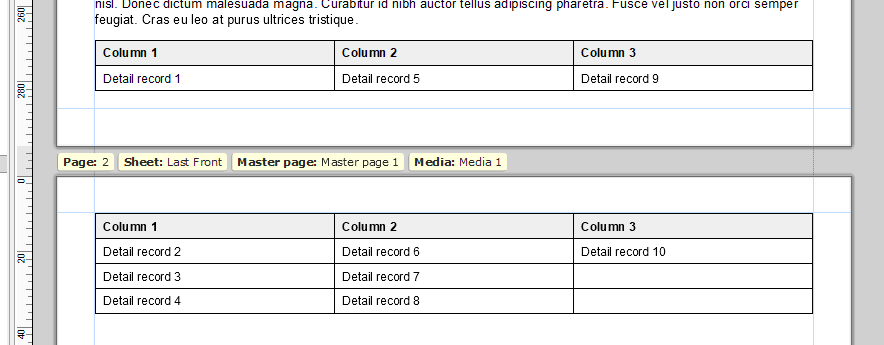
The only values that need to be changed basically are the values of the following variables:
| Variable | Description |
|---|---|
tableName |
Name of the detail table |
fieldName |
Name of the detail table field |
columnsNo |
Number of columns |
Example.OL-template (9.5 KB)
Standard script
Name: Populate table with data
Selector: table#example tbody
var tableName = "detail",
	fieldName = "Sample",
	columnsNo = 3,
	recordsNo = 0;

if (tableName in record.tables) recordsNo = record[tableName].length;

if (recordsNo != 0) {
	var rowsNo = Math.ceil(recordsNo / columnsNo),
		rows = [];

	// 1. Populate the array `rows` with placeholders

	for (var i = 0; i < rowsNo; i++) {
		rows.push([]);

		for (var j = 0; j < columnsNo; j++) {
			rows[i].push("@Column" + j + "@");
		}
	}

	//logger.info("rows: " + JSON.stringify(rows));

	// 2. Polulate the array `rows` with actual data

	var rowIndex = 0,
		columnIndex = 0;

	for (var i = 0; i < recordsNo; i++) {
		rows[rowIndex][columnIndex] = record[tableName][i][fieldName];

		if (rowIndex < (rowsNo - 1)) {
			rowIndex++;
		} else {
			rowIndex = 0;
			columnIndex++;
		}
	}

	//logger.info("rows: " + JSON.stringify(rows));

	// 3. Empty the `tbody` element
	results.html("");

	// 4. Populate the table with data

	for (var i = 0; i < rows.length; i++) {
		var rowElem = query("<tr data-breakable>");

		for (var j = 0; j < rows[i].length; j++) {
			var columnElem = query("<td>");

			if (rows[i][j] !== "@Column" + j + "@") {
				columnElem.text(rows[i][j]);
			}

			rowElem.append(columnElem);
		}

		results.append(rowElem);
	}
} else {
	results.parent().remove();
}