Dynamic table header footer auto repeat and pagebreak

Hi there

I’m working on a transaction table using the default dynamic table setup in PReS Connect 2022.
I tried adding break-after: avoid; and page-break-after: avoid; to <th> and <thead> because I want to prevent a page break immediately after the table header.
At the moment, the PDF sometimes shows the header and footer appear only at the bottom of the page and header content footer at the second page.

Is there a way to properly control page breaks for table headers in PReS Connect?
Also, can we control whether the table header and footer repeat on every page?

Any help would be appreciated.
Thanks!
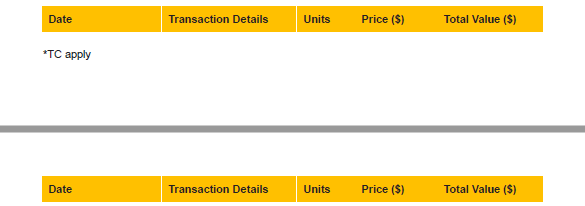
<table id="tableBal0" class="Bal0" data-column-resize="" data-detail="" data-hide-when-empty="" style="width: 100%;" data-expander="2019">
    <thead>
        <tr>
            <th style="text-align: left; width: 23.56%;">Date </th>
            <th style="text-align: left; width: 26.53%;">Transaction Details </th>
            <th style="text-align: left; width: 11.25%;">Units </th>
            <th style="text-align: left; width: 16.03%;">Price ($) </th>
            <th style="text-align: left; width: 20.88%;">Total Value ($) </th>
        </tr>
    </thead>
    <tbody>
        <tr data-repeat="detail">
            <td style="text-align: left;" data-field="transactionDate">@transactionDate@</td>
            <td style="text-align: left;" data-field="transactionDetails">@transactionDetails@</td>
            <td style="text-align: left;" data-field="units">@units@</td>
            <td style="text-align: left;" data-field="unitPrice">@unitPrice@</td>
            <td style="text-align: left;" data-field="totalValue">@totalValue@</td>
        </tr>
    </tbody>
    <tfoot>
        <tr>
            <td colspan="5">
                <p class="TC">
                    <br>
                    *TC apply
                </p>
            </td>
        </tr>
    </tfoot>
</table>

thead{
break-after: avoid;
page-break-after: avoid;

}
.th {
color: #fff;
padding: 8px;
break-after: avoid;
page-break-after: avoid;
}

Hi @mighty2,

That looks odd, I’m not sure what is going on there.

If the unpaginated state has at least one row in tbody, I would never expect a break to be inserted in such a way that one of the pages ends up with no rows in tbody.

If the unpaginated state has no rows in tbody, the data-hide-when-empty attribute should hide the entire table (including thead and tfoot).

I played around with the current version of Connect but I’m not able to reproduce your output.

Please note that the break-after style is not supported, not even in the current version of Connect.

Your “.th” style rule should use “th” as a selector (no period), but that would not work anyway since the only table elements that support page-break-before and page-break-after are <table> and <tr>.

You can control whether rows are repeated using data-show-row, see the documentation here: A Dynamic Table's data- attributes

Perhaps someone else has an idea.

Hi @Sander

Thanks for your reply.

I used a standard query to un-display some content from the Details table. Will that affect it?

selector: #tableCurrent

for(var i = 0; i < record.tables.detail.length; i++){


if(record.tables.detail[i].fields.investmentName.toLocaleUpperCase() != 'Current'.toLocaleUpperCase())
{
	query("tr:nth-child(" + i + ")", results).css('display','none');
}

	
}

Since when I debug the output in browser( I know it does not showing any page-break but it does show that duplicate empty table) which is showing structure for this empty table like

<table class="page-break-after">
<thead>...</thead>
<tr style="display:none"><td>...<td></tr>
<tfoot>..</tfoot>
</table>

Btw I also tried for each matched element with hide() which still give me same result

if(this.record.fields.investmentName !="Current")
{

	this.parent().hide();
	
	}

That is interesting, perhaps that does affect the way it behaves. This is not intuitive behavior, so I would recommend that you open a support ticket so that we can investigate this further.

As a workaround, instead of hiding those rows, does removing them with remove() help?