Hi there
I created barcodes (QR / Matrix) with a color in CMYK, but in the output files (PDF and/or postscript, SVG and/or PNG) is alway in RGB. I need CMYK. Is there a solution?
Thanks for help
Hi there
I created barcodes (QR / Matrix) with a color in CMYK, but in the output files (PDF and/or postscript, SVG and/or PNG) is alway in RGB. I need CMYK. Is there a solution?
Thanks for help
I had the same issue with QR codes and when I contacted a Planetpress tech about this and a couple other things I was told that it was a know problem and was planned to be fixed in a later version. I also tried to convert the color from CMYK to RGB to no avail as well.
Thanks very much
So, waiting for an update … and changing/converting colors in Acrobat / PitStop.
Unfortunately the library we currently use does not support CMYK. We do plan to switch to a different library in the future, but it’s not clear when that will happen.
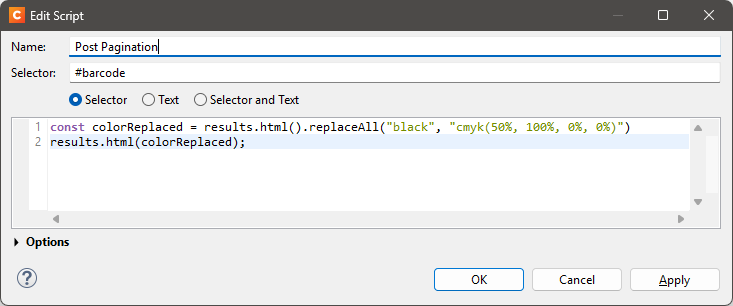
How about this as a hackaround. In the barcode properties, set the output format to SVG and the background to None. Then add the following post pagination script:
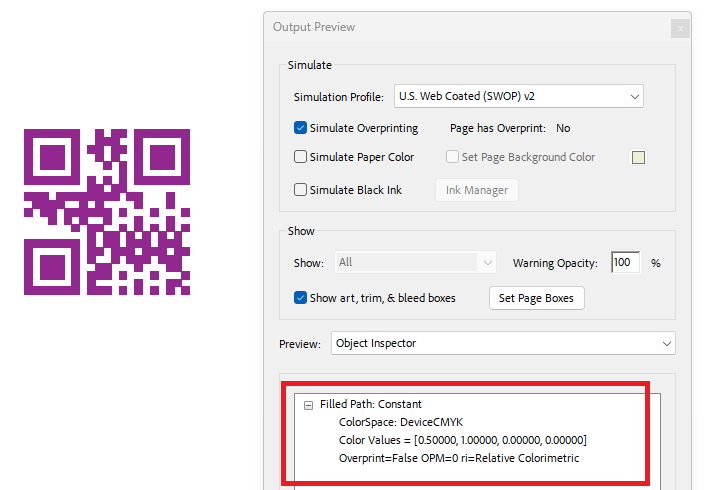
This should produce a barcode that uses DeviceCMYK with values 0.5, 1, 0, 0:
Unfortunately Designer says “cannot find function replaceAll”. Any idea?
Sorry for the late reply. Notifications from this forum seem to end up in my Junk Mail folder for some reason.
Scripts currently rely on Mozilla Rhino, although this will change soon. The replaceAll method was introduced in Rhino 1.7.15, which we have been using since Connect 2025.1.
With Connect 2024.2 or older, try the following instead:
const colorReplaced = results.html().replace(/black/g, "cmyk(50%, 100%, 0%, 0%)")
results.html(colorReplaced)
This is just an example, you can use any CMYK color string.
Works perfect, thank you