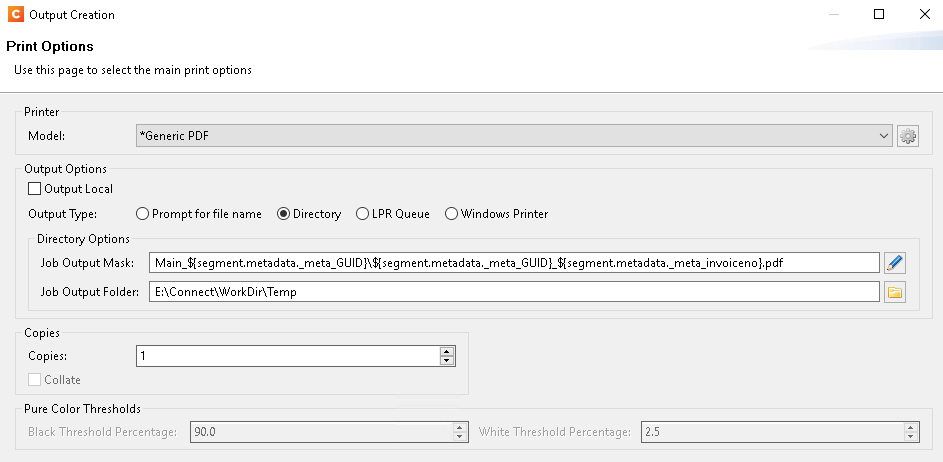
We have a system that generates XML invoices one by one and once the batch is complete our workflow picks it up, merges all the invoices into a single XML file, converts it into JSON and then feeds it into an all-in-one plugin that generates a single PDF and then splits it out based on certain grouping/splitting conditions to individual PDF files with a Job Preset and Output Preset:
Developers are now working on a new system and they want to work exclusively via the API and thus bypassing all workflow processes. I have some questions regarding this:
The Output Preset makes sure all the individual files are stored in a temp folder. Will the invoices still be stored in the Doc store so that they can be retrieved via the API?
I assume that the invoices in the temp folder will not be cleaned up afterwards?
Is it necessary to store them first in a temp folder or can this be bypassed so that the resulting PDF file is still split into individual invoices but then stored directly in the doc store instead?
Yes, the output is stored in the OL Connect’s File Store and can be downloaded through the API. Use the operationId returned by the All-In-One end point in the Get Managed Result of Operation. (after checking the status of the job and making sure it is done ;))
This endpoint returns a JSON object containing the identifier of the managed file along with the name of each file.
etc
2) The output files are so called temporary managed files. Their life time is determined by the settings of the Clean Up service (See your Server Configuration Tool).
3) Think this is answered above.