Currently in workflow if we have a job which is raw data in we have a script which is placed after the create print content and queries the connect database to get the number of pages for each set and then updates the metadata with the page count (this is a field create in the mapper but nothing gets assigned to it).
This page count is then used to makde decisions on what output file to assign the record to and to get counts for work orders etc. Now I know I could get this info by outputting the file to PDF and then reading it back in, however this is very messy and also adds a lot of overhead processing. So is there a way to do this within automate?
I can see where I can get an update the meta data but I’m not sure where I can do the getting page numbers. Below is the script we used to run in workflow
//get number of pages in each pack
var contentSetId = Watch.ExpandString(“GetMeta(_vger_contentset_id[0], 10, Job.Group[0])”);
var connectInfo = JSON.parse(Watch.GetConnectToken());
var url = “”;
try {
var xhr = new ActiveXObject(“Msxml2.ServerXMLHTTP.6.0”);
    xhr.open("GET", url, false);
    xhr.setRequestHeader("auth_token", connectInfo.token);
    xhr.onreadystatechange = function () {
            if (xhr.readyState === 4) {
                    if (xhr.status === 200) {
                            var job = JSON.parse(xhr.responseText);
                            var contentSet = {};

                            for (var i = 0; i < job.length; i++) {
                                    var contentItemId = job[i].id;
                                    var pageCount = job[i].pages[0].count;

                                    contentSet[contentItemId] = pageCount;
                            }

                            var metaFile = new ActiveXObject("MetadataLib.MetaFile");

                            metaFile.LoadFromFile(Watch.GetMetadataFilename());

                            var metaJob = metaFile.Job();
                            var metaGroup = metaJob.Group(0);

                            for (var i = 0; i < metaGroup.Count; i++) {
                                    var contentItemId = metaGroup.Item(i).FieldByName("_vger_contentitem_id");

                                    metaFile.Job().Group(0).Item(i).Fields.Add("_vger_fld_NumberOfPages", contentSet[contentItemId]);
                            }
                            metaFile.SaveToFile(Watch.GetMetadataFilename());
                    }
            }
    };
    xhr.send();
I’m just dropped that in but I get an error sayign incorrect property jobSetID. This was what was put in when I dropped in the node so not sure what this should be
It requires the jobSetId generated by the paginated job node. So you flow should look something like this:
data mapping > paginated content > paginated job > job statistics
Erik, I’ve got this now, however I’m struggling to figure out how to update the metadata with the page count. I was thinking do I need to split the payload from the job statisitics, and loop round it to do a get meta for each record and then a data update with the number of pages?
Just checking to make sure I’m understanding correctly and that we’re referring to the same metadata in the context of OL Connect Automate. Could you provide a sample of the information and structure you’re aiming for? The Job Statistics data also includes custom properties on the documents, which might already cover what you need.
So what we usally do is to run the create print output, then run the script I mentioned and assign the number of pages to each record via the NumberOfPages data field we add via the datamapper which is empty until this point. We then look at the numebr of pages and assign a “stream” (automail, manmail etc) and assign to to another data field. We then group the output via the stream and output the files. All of this field assignment is done via a script within workflow at the moment
So I can see how I can get this page count via the job statistics but struggle to understand how I can then add it back into the metadata for each record. I’m guessing I do the below steps now
data mapping > paginated content > paginated job > job statistics > paginated job > ?? to add page count back in > job statistics > Output Pages to PDF
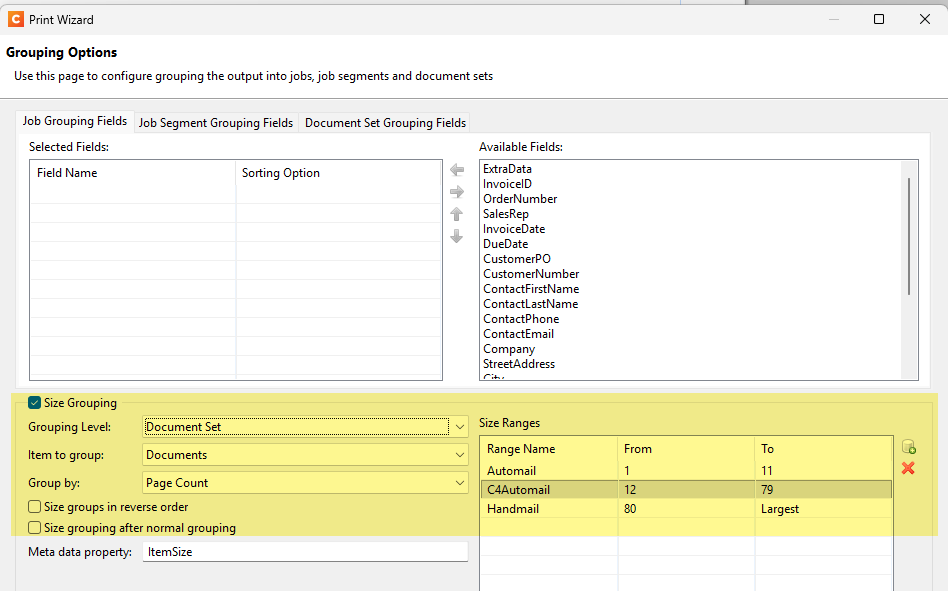
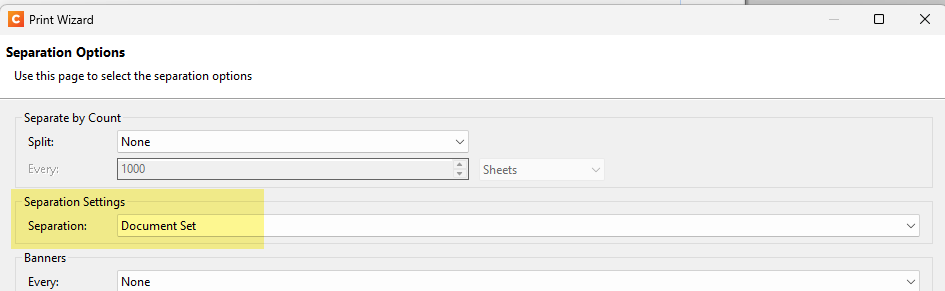
Great info, that helps! I think you do not need to go down the path of Job Stats and updating the database. You could achieve things using the Size Grouping feature in a Job Preset combined with Separations per Document Set. Did you explore that? Below some screendumps.
Yeah I have looked at that but depending on the job those counts may change and also may have other rules on top which aren’t just based on page count (Overseas Addresses, number of inserts require) which you need to build rules around which aren’t possible in job configs.
We also need to create detailed MI information which feeds into the MI system for things like number of inserts required etc. I know I could get round this by outputting to PDF and then reading back in but this adds a lot of overhead and extra processing time.
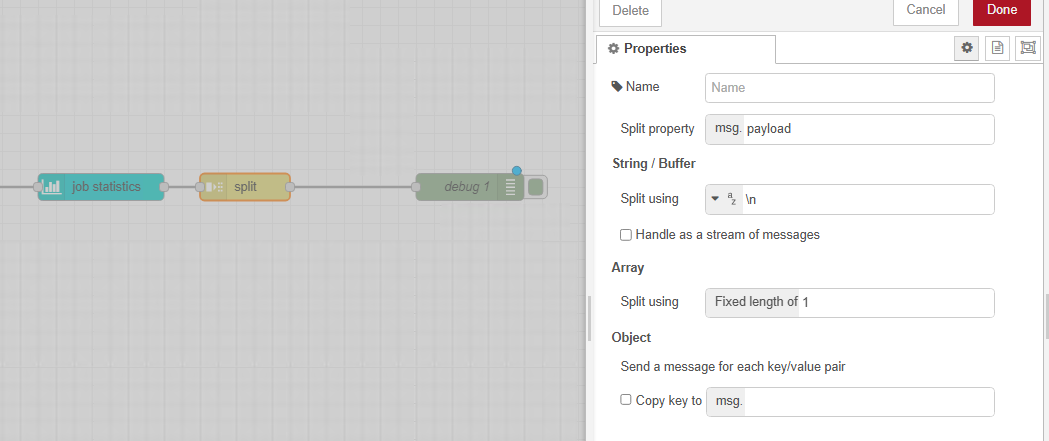
I’ve got in my mind how to do it all now apart from understanding what settings I need in the split command after the job statistics
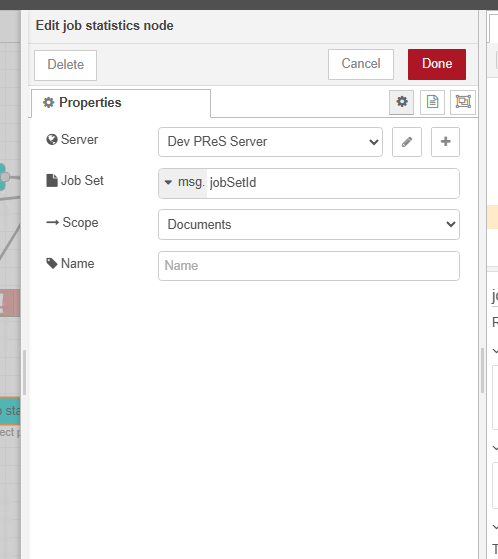
Job Statistics retrieves the job related information.
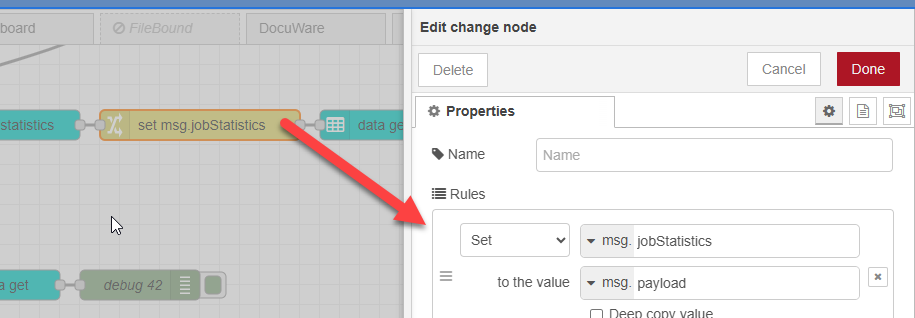
Change copy the information from msg.payload to msg.jobStatistics
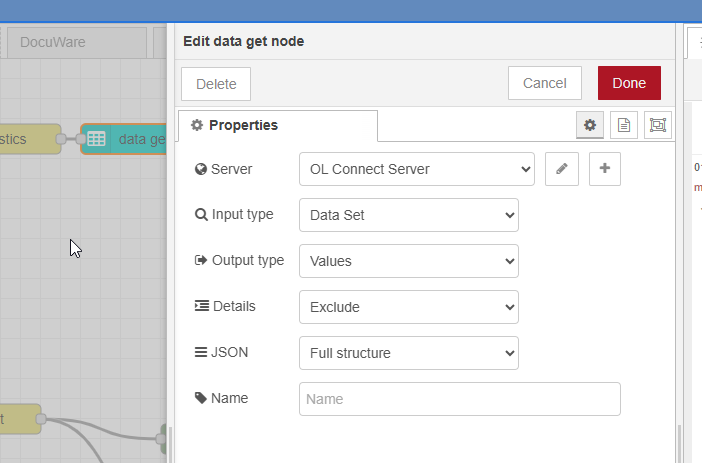
Data Get retrieves the data records of the current Data Set. I’m using the Full structure which can be modified and later be used to update the data records in the OL COnnect database/
Function custom script to lookup the count.pages in msg.jobStatistics (see code sample below, which in my case writes the value to ExtraData, which could be changed to a different field)
Data update updates the data records in the database
Does this work for you?
const records  = msg.payload;
const jobStats = msg.jobStatistics

// Build lookup from jobStats documents instead of records
const docLookup = jobStats.documents.reduce((acc, doc) => {
  acc[doc.dataRecordId] = doc;
  return acc;
}, {});

// Update each record based on the lookup
records.forEach(record => {
  const doc = docLookup[record.id];
  if (doc) {
    record.fields.ExtraData = String(doc.counts.pages);
  }
});

return msg;
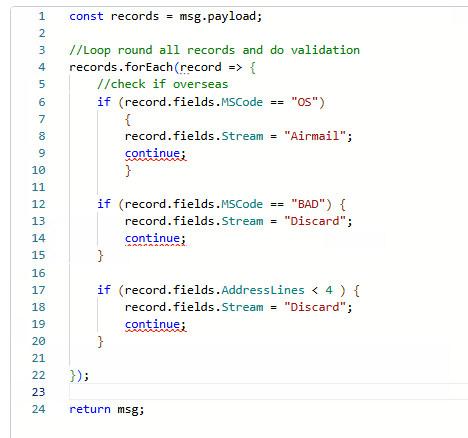
Sorry last question for awhile hopefully… but instead of using records.foreach is there a similar fucntion to get the record count and do a for loop instead? Reason I’m asking is before we migth have several if statements and if it hit one then we’d do a continue; so it left the loop and didn’t check anymore, but if I try that using that with forEach I get Jump target cannot cross function boundary.(1107)
Basic example below, trying to avoid using nested IF, ELSE …
const records = msg.payload;

for (const record of records) {
    const fields = record.fields;

    if (fields.MSCode === "OS") {
        fields.Stream = "Airmail";
        continue;
    }

    if (fields.MSCode === "BAD") {
        fields.Stream = "Discard";
        continue;
    }

    if (fields.AddressLines < 4) {
        fields.Stream = "Discard";
        continue;
    }

    // Perhaps add a fall back for standard mail
    fields.Stream = "Standard";
}

return msg;
 Could you provide a sample of the information and structure you’re aiming for? The Job Statistics data also includes custom properties on the documents, which might already cover what you need.